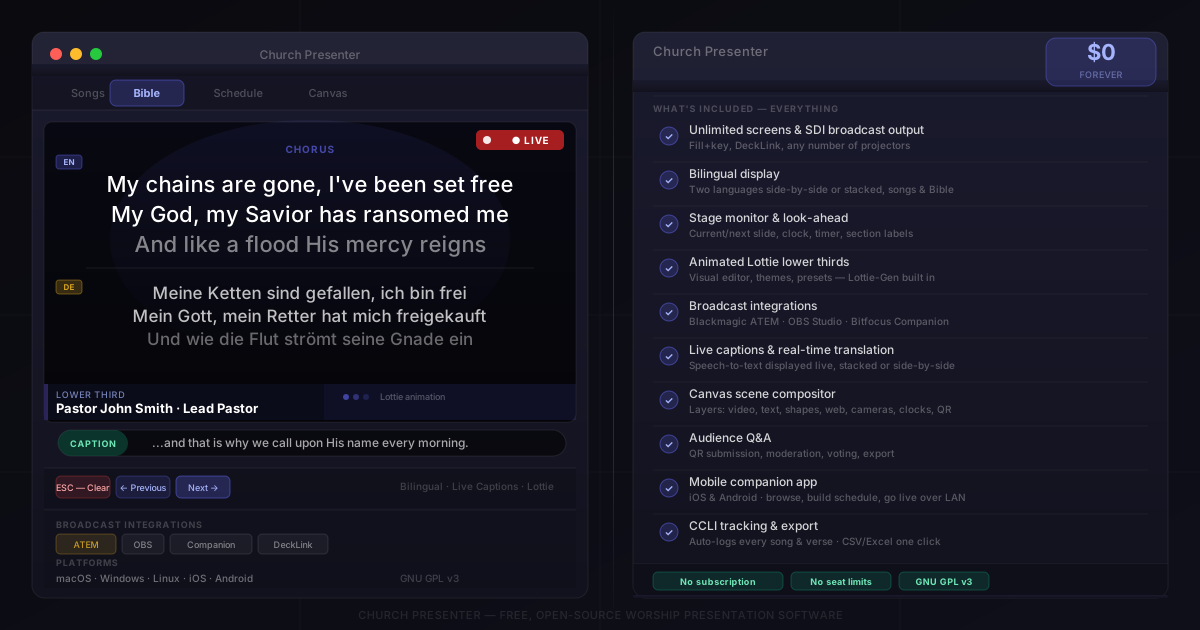
There’s a mental model that’s hard to shake: free software is the trial version, the light edition, the one where the good stuff is locked behind a paywall. It’s a reasonable assumption — most software works that way. Worship presentation software especially has trained people to think in tiers, where multi-screen output is standard, bilingual lyrics is an add-on, and broadcast integrations are enterprise.
Church Presenter doesn’t work like that. There’s one version. It’s free. Everything is in it.
This post is for anyone who has looked at Church Presenter, assumed the free part meant “basic,” and moved on. Here’s what that assumption costs you.
Multi-screen output — unlimited screens, included
Most paid tools charge per output, per seat, or per license. Church Presenter supports unlimited projection screens at no cost — projectors, TVs, Blackmagic DeckLink cards, SDI broadcast outputs. You can run a fill+key setup for broadcast, send a confidence display to the stage, and push to the main screen simultaneously.
In commercial software, the SDI broadcast output alone often requires the highest tier. In Church Presenter, it’s just a setting.
Bilingual display — two languages, one screen
If your congregation worships in more than one language — a growing reality for churches in multilingual cities and diaspora communities — displaying both languages together is not a niche feature. It’s a Sunday-morning necessity.
Church Presenter supports side-by-side and stacked bilingual display for both song lyrics and Bible verses. You pick two translations or two language versions of a song, and both appear on screen at once. No workaround, no manual slide duplication, no per-language add-on.
The Stage Monitor — a full confidence display
Worship leaders need to see what’s coming without turning around to look at the projection screen. The Stage Monitor in Church Presenter gives them a dedicated display showing the current slide, the next slide, a clock, countdown timer, and section labels — everything a worship leader needs to lead without cues from the operator.
This is the kind of feature that sounds like a premium upgrade. It isn’t.
Animated lower thirds — with a visual editor
Church Presenter includes Lottie-powered animated lower thirds — the name-and-title graphics that slide in over live video. You get a full visual editor (Lottie-Gen) built into the app: choose a color theme, set your fonts, upload a logo, pick an animation style, and export. Reusable presets mean you build the look once and apply it in seconds.
In broadcast production tools, animated graphics like these typically require a separate purchase or a subscription to a graphics service. Here it’s built in and takes about five minutes to set up.
Broadcast integrations — ATEM, OBS, Companion
Professional broadcast environments run Church Presenter alongside:
- Blackmagic ATEM — Church Presenter feeds lower-third graphics directly into the ATEM’s media pool and triggers the upstream key, so switching lower thirds is a one-button operation on the switcher.
- OBS Studio — Church Presenter can trigger scene switches in OBS based on what’s live on screen, keeping your streaming setup in sync with your presentation automatically.
- Bitfocus Companion — Stream Deck buttons can control Church Presenter over the network, sending slides, triggering actions, and clearing the screen from a hardware panel at the operator desk.
These integrations are for professional environments, and they’re free.
Live captions and translation
Church Presenter can display real-time speech-to-text captions on screen as the pastor speaks — useful for hard-of-hearing congregation members or for multilingual services where the spoken language differs from the displayed one. Captions can appear stacked or side-by-side with a translation.
This is genuinely difficult to find in any worship presentation software, free or paid.
The Canvas scene compositor
The Canvas module lets you build a scene from scratch — images, text blocks, video, shapes, clocks, QR codes, webcams, screen capture, web views, and live Bible verses, all layered and positioned visually. Think of it as a lightweight streaming graphics tool built into your presentation software.
For churches that produce a more produced service or a livestream, Canvas replaces several separate tools.
Audience Q&A
Church Presenter has a built-in Audience Q&A system: a QR code on screen lets congregation members submit questions from their phones. Questions come in, you moderate them, approved questions display on screen, and attendees can vote on them. Session exports are available after the service.
Most churches use third-party apps for this and pay a monthly fee. In Church Presenter it’s included and works offline over the local network.
The mobile app — for free
The Church Presenter mobile app (iOS and Android) connects to the desktop over your church’s Wi-Fi. From their phone, a worship leader or volunteer can browse songs and scripture, build and reorder the schedule, and push items live — with the desktop operator retaining approval control.
The app is free. There’s no per-device fee, no subscription, no seat count.
No seat limits. Ever.
Church Presenter is licensed under GNU GPL v3. You can install it on every computer in your building, run it at your campus, hand it to a sister church in another country — no restrictions, no per-device cost, no license keys.
For a church with multiple campuses, multiple volunteer operators, or a sister congregation that can’t afford software at all, this changes the math entirely.
CCLI tracking — automatic
If your church holds a CCLI license, you’re required to report the songs and Scripture passages you present each service. Church Presenter logs every song and verse you send live and generates a CCLI-ready report with one click from Edit → Statistics → CCLI Report. Export it as CSV or Excel.
Automatic CCLI tracking is a paid feature in most worship software. In Church Presenter it’s always been included.
Linux support
ProPresenter doesn’t run on Linux. EasyWorship doesn’t. Most commercial worship software is Windows and Mac only. Church Presenter runs on all three — which matters for churches that run Ubuntu or other Linux distributions on their media computers, or for ministries in regions where Linux hardware is common.
Free software earning skepticism makes sense as a general rule. But the reasons commercial worship software justifies its price — feature depth, broadcast capability, output flexibility — are exactly where Church Presenter is strongest.
If you’ve been holding off because “free” felt like a compromise, it’s worth spending an afternoon with it. The setup guide gets you from zero to Sunday-ready in under an hour.
Already using it? See 10 tips for smoother Sunday morning presentations to get more out of what you already have.